

IT teams charged with building an IT strategy are faced with the fundamental choice of how they want to deploy cloud: public, private, or hybrid. The cloud deployment choice has a major impact on costs, security, agility and the ability of teams to roll out new services in the quickest time possible. This post guides you through public vs private vs hybrid cloud in clear, straightforward terms, so that you can effectively align your cloud choice with your business’s unique needs. We will cover a look at the benefits, challenges, and how organizations most commonly use a mixture of public, private, and hybrid cloud.
Understanding Cloud Deployment Models
What Are Cloud Deployment Models?
Cloud deployment models explain where the cloud providers put the infrastructure and what they provide to the users. Each one has different functions based on user’s needs and can save money, reduce risks and also fulfill their needs.
Why Deployment Choices Matter for Businesses
The criteria by which a company selects deployment model for their business are:
- The provider owns the infrastructure.
- Infrastructure is operated by the provider.
- Infrastructure is provided where the user needs it.
- Who has access to resources?
- How providers share resources or distribute.
Evolution of Modern Cloud Infrastructure
1950s-1990s – Mainframes to Utility Computing.
Originally, most computation was done on very large machines called mainframes. In the 1990s, the centralized computer centres set the foundations for hosting and utility computing.
The Modern Cloud Revolution 2000s.
The end of the 90s brought Software as a Service (SaaS) to the forefront, with the introduction of AWS’ EC2 service in 2006 bringing Infrastructure as a Service (IaaS) to life.
2010s – Cloud Platforms and Abstraction.
As the main competition such as Google Cloud and Microsoft Azure was growing, Platform as a Service (PaaS) arose. It was designed to provide better support for software development.
The Present – Modern Orchestration.
Cloud applications orchestrate on the basis of container orchestration and serverless technologies, and a growing trend of multicloud or edge orchestration (for example AWS Lambda).
Key Factors That Influence Cloud Adoption
- In a rapid, accelerating tech landscape, organizations rushing into the cloud are often leaning into what we suggest are actually best practices. This brings biases and leads to poor decisions for many companies.
- Businesses that are further along in their journey have learned the hard way to hypothesize and test in order to validate the idea of failure in the organization’s culture to embrace resilience and innovation – timely data in support of timely decisions.
- With many successful cloud journeys comes a ‘survivorship bias’, where many organizations make near-sighted, quick decisions. Those further ahead analyze the “race to zero mentality” and focus on strategic answers rather than reactionary ones. Invest the time and resources on what to do long-term, not short-term trends.
- Organizations have overfit on certain decisions that lead to high expenses. Further-along businesses, on the other hand, plan on the different economies that workloads support, and they pick the cloud model that is appropriate while considering the scalability impact on costs.
- A lack of technical and leadership training adds to decision biases. Mature businesses realize that they are learning organizations, and they need to make changes in their workforce through education and new talent acquisition in order to realize the maximum potential of cloud services.
- Between the large players in the cloud marketplace and niche options, mature businesses strategically choose the partners and tools to build an optimal environment. They consider workload requirements against the commercial needs of the business.
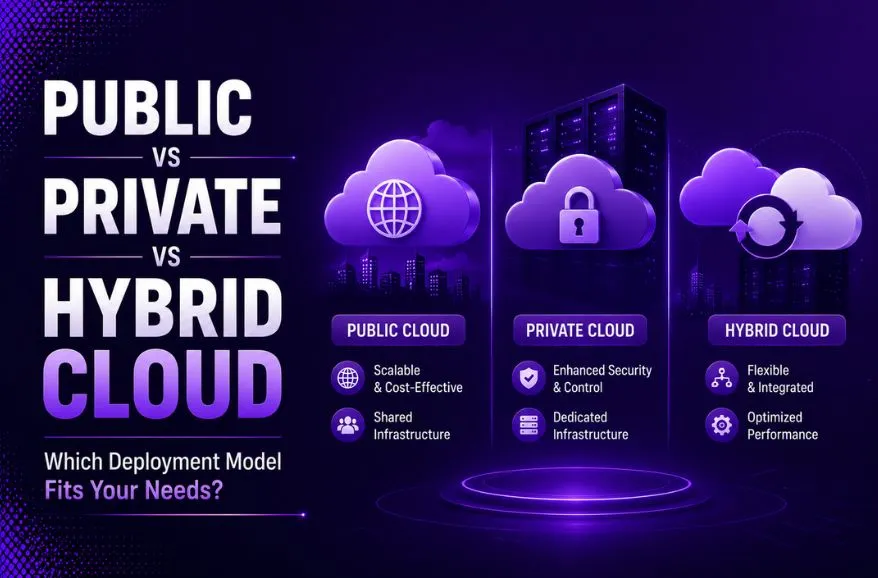
Public vs Private vs Hybrid Cloud – A Quick OverviewWhat Is a Public Cloud?
Public Cloud is a type of cloud service is a fully owned, operated, and maintained cloud environment owned by a third-party vendor. The cloud services provider delivers it over the public Internet and services it to various customers. It is multi tenancy, when resources are shared across many clients.
What Is a Private Cloud?
Private Cloud is a type of cloud environment is an owned exclusively by a single organisation. It may also exist within your private data centre and may be operated or by third-party as long as it will never be shared with clients.
What Is a Hybrid Cloud?
Hybrid Cloud is a type of cloud service that combines public and private clouds. In which companies can now transfer their data and applications to the cloud provider. It also offers flexibility to companies when they transfer sensitive information over private clouds. It also includes running less critical applications over public clouds.
Public vs Private vs Hybrid Cloud Comparison Table
| Criteria | Public Cloud | Private Cloud | Hybrid Cloud |
| AI Readiness | High | Moderate | High |
| Cost | Low upfront, pay-as-you-go | High setup, long-term savings | Moderate |
| Scalability | High | Moderate | High |
| Security | Shared responsibility | Full control | Balanced |
| Customization | Limited | High | High |
| Management | Easy | Complex | Moderate |
| Cost Control (FinOps) | Requires active monitoring | Predictable and controlled | Optimized across environments |
| Use Case | Startups, dev/test apps | Regulated industries | Enterprises with mixed workloads |
What Is Public Cloud Computing?
How Public Cloud Infrastructure Works
These providers run large, multi-tenant datacenters and expose resources via APIs. Customers provision virtual machines, managed databases, and platform services on-demand.
Characteristics of Public Cloud Environments
- On-demand self-service: You can get access to computational resources when you need them on your own terms, no communication required with provider. You can perform these actions online, remotely over the internet by using a web browser, command-line interface, or APIs.
- Broad network access: Services are available over the Internet or a dedicated private network link.
- Elasticity: It increases and decreases in provisioning. It deletes provisions without human intervention rapidly and automatically. It eliminates the need for a long process of hardware purchases or provisioning new virtual servers.
- Measured service: It automatically controls and optimizes the use of resources in cloud computing. As it is based on the resource usage measuring capability. Cloud services are monitored, controlled and reported to ensure transparency between both the provider and the consumer.
- Resource pooling: Resources are pooled for the benefit of multiple consumers through the use of a multi-tenant model but can optionally be configured to be specific to single tenants.
Advantages of Public Cloud Adoption
- This can support work streams of almost any scale, no matter if it is small, large and any size in between.
- Proves provisioning is cost effective and comes with no front cost.
- Large selection of services available within the catalog, ranging from bare-metal, to business services.
- Price competitive and cost effective compared to Public Cloud vendors.
Potential Limitations and Risks
- Both tenants in ChaosDB share liability. For sensitive data.
- Public cloud might not help with data residency/privacy laws.
- You pay for everything. Datacentre bills are pretty fixed, less variable.
Benefits of Private Cloud Security
- Reduced exposure of sensitive data by bounding it to your organization.
- Better choice of where your data lives, and a stronger handle on privacy considerations.
- Increased control and tighter access.
- The ideal candidate in comparison to on-premise processing.
Challenges of Managing Private Cloud Resources
- A service offering portfolio is quite narrowed, when it’s confined to a private cloud.
- A massive jump up in costs for both consumer and cloud service provider.
What Is Hybrid Cloud Architecture?
How Hybrid Cloud Environments Operate
Private clouds combines with existing ones or a private data center in a public cloud to become unified under APIS, secure network lines or VPNs. Virtualization and containers arrange application placement in a uniform and consistent fashion across compute infrastructure/environments available.
Why Hybrid Strategies Are Growing in Popularity
It’s become clearer to organizations that they’re moving toward a hybrid workplace. It is an advantage for finance, the cloud model, as it is the “best of both worlds”. They want to leverage the cost advantages and scalability offered by a decentralized approach. Whilst utilizing the benefits of compliance and security of the centralized one.
Public Cloud vs Private Cloud – Key Differences
| Public Cloud | Private Cloud |
| Cloud Computing infrastructure is shared with the public by service providers over the internet. It supports multiple customers i.e, enterprises. | Cloud Computing infrastructure is shared with private organizations by service providers over the internet. It supports one enterprise. |
| Multi-Tenancy i.e, Data of many enterprises are stored in a shared environment but are isolated. Data is shared as per rule, permission, and security. | Single Tenancy i.e, Data of a single enterprise is stored. |
| Cloud service provider provides all the possible services and hardware as the user-base is the world. Different people and organizations may need different services and hardware. Services provided must be versatile. | Specific services and hardware as per the need of the enterprise are available in a private cloud. |
| It is hosted at the Service Provider site. | It is hosted at the Service Provider site or enterprise. |
| It is connected to the public internet. | It only supports connectivity over the private network. |
| Scalability is very high, and reliability is moderate. | Scalability is limited, and reliability is very high. |
| Cloud service provider manages the cloud and customers use them. | Managed and used by a single enterprise. |
| It is cheaper than the private cloud. | It is costlier than the public cloud. |
| Security matters and dependent on the service provider. | It gives a high class of security. |
| Performance is low to medium. | Performance is high. |
| It has shared servers. | It has dedicated servers. |
| Example: Amazon web service (AWS) and Google AppEngine etc. | Example: Microsoft KVM, HP, Red Hat & VMWare etc. |
Benefits of Hybrid Cloud for Modern Enterprises
- Flexibility: Send workloads to the place they’ll be best served. Use public cloud to test and development projects or for those time-limited activities. Keep secure or private information within private cloud resources.
- Faster application development: Implement a more agile development pipeline; extend the use of DevOps to gain faster application to time to market.
- Digital transformation and Big data: Harness massive datasets and supercompute power. Also, use a world of innovation services including the latest generative AI and machine learning.
Security Considerations Across Cloud Deployment Models
1. Improper access controls
Over time, as your team rapidly innovates, permissions can snowball and spread like wildfire. As it would be without the fixed structural safeguards in place to remove what identities no longer require access to.
2. Open access cloud services & APIs
The cloud ecosystem functions on APIs; poorly implemented security measures allow attack vectors direct access into those systems and services.
3. Loose network architectures
The lack of separation, where each workload can communicate freely, essentially means that a compromise can propagate anywhere.
4. Poor visibility/centralization
Limited visibility into your infrastructure, via fragmented logging and monitoring capabilities, hinders the security team’s ability to detect threats or investigate incidents. This impacts across multiple accounts or cloud regions.
Cost Comparison: Public, Private, and Hybrid Cloud
| Cost Consideration | Public Cloud | Private Cloud | Hybrid Cloud |
| Cost Structure | OPEX (Pay-per-use/Subscription) | CAPEX (High upfront) | Mixed (CAPEX on-premises + OPEX public) |
| Upfront Investment | Low or zero; no physical hardware to buy | High; significant upfront hardware and facility investment | Moderate; depends on the scale of the required on-premises private cloud |
| Variable & Fixed Costs | Compute and storage fluctuate with usage; watch out for data egress (bandwidth) fees | Largely fixed; ongoing power, cooling, and hardware maintenance | Combination of predictable fixed private costs and dynamic public cloud usage |
| Maintenance & Labor | Fully managed by the third-party provider | Managed entirely by internal IT staff | Requires internal platform ops plus unified control planes and monitoring tools |
| Scalability & Capacity | Near-instant elasticity to automatically scale up or down | Limited by the physical hardware owned by the organization | High; scalable public resources handle peak traffic (“cloud bursting”) |
Compliance and Regulatory Requirements
1. General Data Protection Regulation (GDPR): The EU law concerning data protection and privacy, it means that anyone dealing with the personal data of an EU resident, will put the focus ondata sovereignty and compliance.
2. Health Insurance Portability and Accountability Act (HIPAA): The US law focuses on the security of protected health information (PHI). Organizations have to provide safe solutions for their PHI and hold their cloud vendors jointly responsible. Business associate agreements are typically put in place.
3. The Payment Card Industry Data Security Standard (PCI DSS): The worldwide payment card data security standard for any entity that accepts, processes, stores or transmits cardholder data.
4. ISO 27000 Family of Standards: A family of information security management standards that, for example, helps organizations to comply with the specific requirements related tocloud security in ISO 27001 and 27017.
5. System and Organization Controls 2 (SOC 2): SOC 2 set forth criteria to manage customer data within a service organization under 5 principles of trust- security, availability, processing integrity, confidentiality and privacy. Often required by cloud and SaaS providers.
Cloud Migration Strategy – Choosing the Right Path
Step 1: Do an inventory – Document all your apps, databases and all their dependencies within your ecosystem. You can’t determine what to move if you don’t know what you’ve got, right? Discovery brings unknown dependencies to the surface.
Step 2: Define your business needs – Know why you’re going to the cloud: cost savings, scalability, disaster recovery? Your decision on why you’re going to the cloud will influence your overall decisions on how you’ll move.
Step 3: Select a cloud provider – No two clouds are created equal. Whether you go with AWS, Azure, Google Cloud or other cloud service provider (or selecting combined), research which options are the best match based on your top-priority requirements. You may even choose a multi-cloud or hybrid cloud approach in which you store different types of workloads in different environments.
Step 4: Prioritize your workloads – It’s generally a bad idea to try to migrate everything to the cloud at the same time. Start with the low-risk apps that will yield immediate, visible results. These initial moves can help build confidence among your staff and allow them to gain the new skills they’ll need for later stages.
Step 5: Choose a migration methodology – A sound strategy for cloud migration will involve leveraging the “6 Rs” of migration methodologies such as re-hosting, re-platforming, re-factoring, among others. You will likely apply different methodologies depending on the business value and requirements of each individual workload.
Step 6: Plan for security and compliance – Before you migrate anything, determine your data residency needs, how you’ll encrypt data, and which regulations and standards you need to meet. Once you’ve moved it, addressing these concerns is much harder, and much more expensive.
Step 7: Train your team – Moving to the cloud often means learning entirely new skills and ways of operating. Train your existing IT staff on new tools and processes and consider hiring cloud specialists for support. Your staff will be one of the most critical components to your cloud migration success.
Common Use Cases for Public Cloud
1. Storage: The major cloud service vendors use storage as-a-service where resources scale with needs. This also makes data redundancy possible, protecting it against disasters and outages and promoting business continuity.
2. Dynamic resource allocation: Public cloud services have a lot of elasticity, where resources scale based on the need for computational power and storage capacity. If you run an online store that expects rapid surges in customer volume during major events such as holiday seasons or a Black Friday Sale, this is excellent. If demand slows down, then you can reduce the scale down, meaning you’re just paying for computing you actually use, anytime of the day.
3. Test and development: If you’re one of many app developers out there, then a public cloud can provide you with an app tester with an ideal setting where the application is easily and swiftly tested. Users are also able to rapidly pull up or remove a virtual environment when necessary.
Common Use Cases for Private Cloud
1. Data Privacy & Compliance Requirements: They are well suited to a company, and or organisation, that have information privacy and information security requirements or some administrative/legislative requirements. For instance, the standards in the HIPAA shield health data from sharing across a collection of health information frameworks. It is best where the private cloud would give a readily accessible and secure environment with the correct administration. Also, providing physical security controls to protect confidential health data.
2. Private Cloud Storage: Larger monetary organizations for instance, may harness their capacity to keep their data secure by controlling it via a private cloud. A private cloud offers data storage with control over which clients and applications can access the data. It is done by incorporating certain private cloud characteristics that control access with administrative settings. Thereby, empowering licensed users to access only certain kinds of customer data. It secures data using private connections with clients and their applications, for instance, with VPNs.
3. Application Modernization: Several businesses leverage private clouds as part of their cloud modernization efforts. By making modifications or adjustments to enable private clouds to handle these mission-critical workloads you can achieve a smooth migration to the cloud for your legacy apps.
Common Use Cases for Hybrid Cloud
1. Development and Testing (Dev/Test): Hybrid clouds take a number of challenges of on-premises app development and testing away. The benefits to DevOps are cost efficiency, rapid access and faster speed to market in a public cloud. With the potential to later migrate the app to a private cloud (in case of the security need or a business opportunity). It can also assist the organization’s attempt at modernization of apps.
2. Cloud Bursting: Cloud bursting supports workloads that fluctuate. Businesses can handle peak workloads by bursting requests to a public cloud infrastructure and diverting overflowing demands from private clouds. It also keeps workloads up, utilizes on-premises resources effectively, and minimizes on-prem hardware expenditure.
3. Edge Computing: A computing approach in a distributed manner which carries out the workload at the source of data, this will be applied to an application like IoT or a real-time monitoring system. Integrating these with hybrid clouds allows for low latency and high-bandwidth applications that flow in and out from on-prem, on public cloud and Edge computing environments.
Which Cloud Deployment Model Is Best for Your Organization?
1. Security
Consider how you want to control the security of your data in a cloud. Public clouds’ built-in security is convenient but exposes you to risks associated with sharing space. Private clouds enhance security while also forcing you to manage it internally. If you are considering hybrid and multicloud, you’ll need to plan an all-encompassing security plan that keeps policies uniform.
2. Regulatory compliance
Businesses are expected to meet the compliance requirements, particularly those in the regulatory industries. A private and community cloud usually satisfies high-level compliance requirements, and a public cloud model may not configure for the purposes. Companies ought to review various laws and standards in regulatory environments, such as GDPR, HIPAA, etc., and select cloud models accordingly.
3. Cost implications
Public clouds present cost-effective approaches through pay-as-you-go mechanisms. As the inverse, private clouds necessitate large upfront investment. The blend of Hybrid or Multi cloud may come at higher management fees but may reduce the capital costs and increase operational efficiencies. A proper cost-benefit analysis should be prepared for all scenarios in the long run.
4. Performance and scalability
Public clouds offer superb scalability for rapid expansion as needed with variable workloads. Private clouds promise stable and constant performance for constant loads. Both Hybrid and Multi clouds help allocate resources to the most in-need locations and they must be properly configured to optimize their overall performance.
5. Management and control
With a private cloud, you are able to have maximum control of your environment but need to employ internal resources. A public cloud allows you to be free of the burden of system management. In the Hybrid or Multi cloud solutions, integrated solutions need to be created for system management. It is necessary for unified visibility and control of multiple cloud environments.
Common Mistakes Organizations Make During Cloud Adoption

Future Trends in Cloud Deployment Models
Edge Computing & Decentralized Cloud
Processing data is moved much closer to the data’s origin. This brings reduced latencies, cheaper bandwidth and enhanced security. Use Case: An enterprise processes IoT data at a facility level to avoid costly trips to the remote cloud.
AI and automation of Cloud Infrastructure
The integration of AI optimizes infrastructure provisioning, performance, security monitoring, and cloud management. In the case of e-commerce, an AI tool automates scalability to achieve a seamless user experience, especially during traffic surges.
Serverless & Function-as-a-Service (FaaS)
Serverless computing requires paying only for computation time, which eliminates any need for manual configuration and management of servers, and reduces operating costs. A good example is a fintech company that ‘saves Servers’ to its Customer transactions where it relies only on a Serverless API.
Quantum Computing & Cloud Integration
Quantum computing will help increase the powers of cloud computing infrastructure, deepen complex problem solving and redefine encryption. A cybersecurity provider adopts quantum encryption for cloud data to boost security measures.
Conclusion
One thing is sure, public vs private vs hybrid cloud approach is a strategic business decision, and not simply a technical decision. Public cloud delivers scalability and velocity; private cloud offers control and compliance, while hybrid cloud combines both approaches to satisfy complex, real world requirements. Evaluate your workloads, compliance requirements, cost models and long term growth plan. Then choose your cloud approach, remembering that most companies benefit from a hybrid approach to put the workload in the right place. Choose the right cloud strategy for your organization and you will optimize costs, increase speed of delivery, enhance agility and strengthen resilience.
FAQs
Q1. What is the difference between public, private, and hybrid cloud?
A third-party managed server that numerous consumers utilize is a public cloud. These can expand rapidly and only spend for what you utilize. The private cloud offers facilities dedicated to a single organization like better security, control, and compliance. Hybrids combine these and allow enterprises to host critical applications securely and access cloud resources when business volume peaks.
Q2. Is hybrid cloud better than public cloud?
Hybrid cloud provides organizations with a secure environment for compliance when they need access to sensitive data for compliance, yet the scalability of the public cloud when there are ‘burst’ traffic requirements.
Q3. Which cloud deployment model is the most secure?
The private cloud seems to be the safest deployment model according to experts.
Q4. What are the benefits of hybrid cloud architecture?
The advantages of hybrid cloud solutions are improved flexibility and better resource sharing, optimized cost-efficiency, strong scalability when handling traffic peaks, stringent security conditions for sensitive data and superior disaster recovery capabilities.
Q5. How much does cloud migration cost?
For small workloads, cloud migration expenses can range from $20,000 to $100,000; large enterprise ecosystems can easily result in expenses being above $500,000.
Q6. Which cloud deployment model is best for small businesses?
The public cloud is the preferred cloud deployment model by small businesses.

Leave a Reply